Masking in retouch
When subjects move in the frame due to them, the wind or us moving the camera, we sometimes get those halos around otherwise clearly defined structures.
We can obviously do a fine tuned retouch with all the great tools you provide.
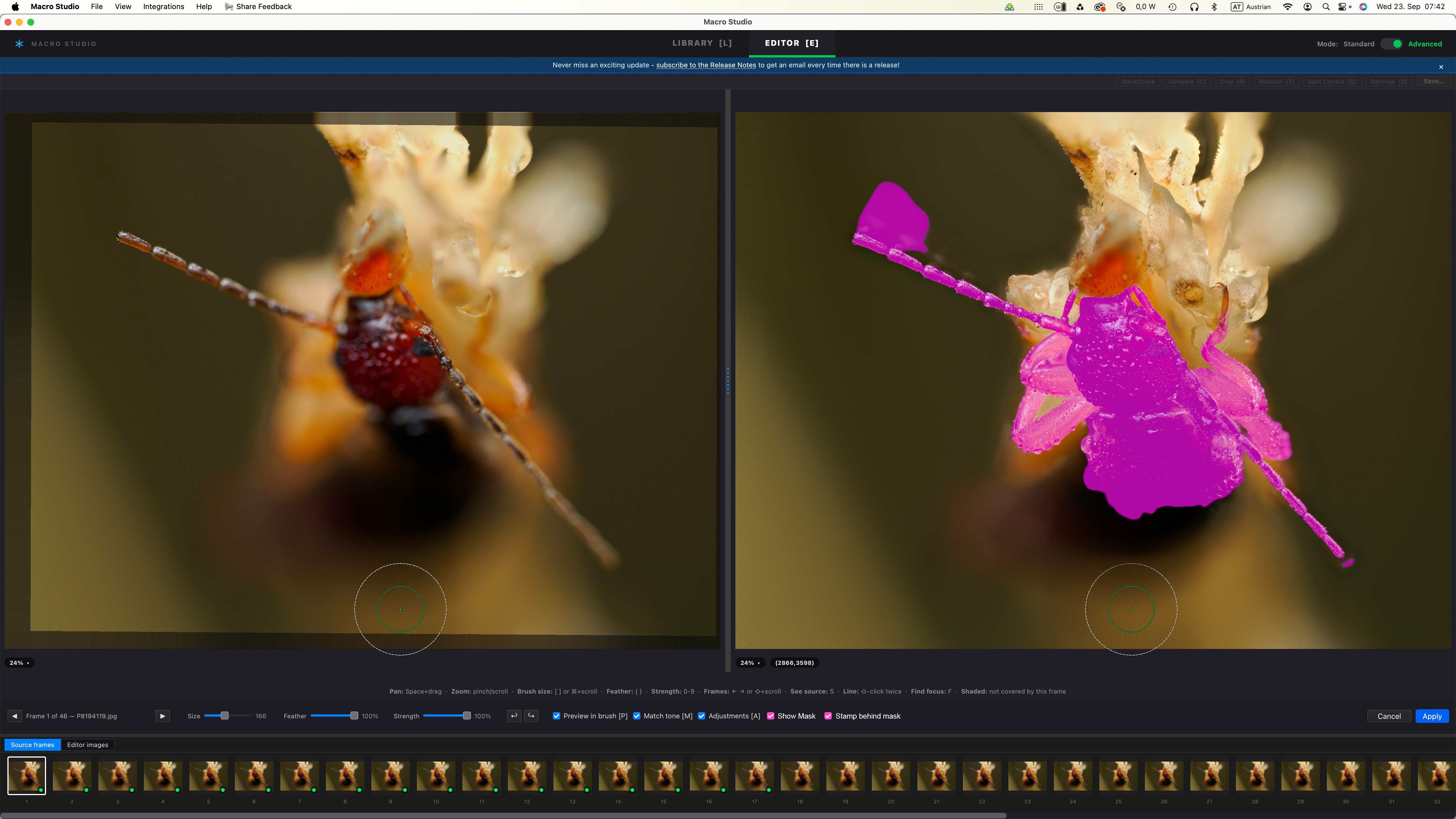
However, I think things could be even improved by using masking. For example the antenna in this shot: I could use small brushes to edit that, but way more effective would be if I could stamp behind a mask.
I think a simple checkbox to show the mask and stamp behind a mask (see mockup) should work in many instances. Obviously refining a mask or even a tool similar to photoshops “Object Selection Tool” would be even better.
Another option would be to mask only the 2-3 frames before and after the currently selected source frame, because very often the halos are created from movement in the out of focus frame.
And another idea 🤔 : what if we could on demand change the single source frame to an intermediate stack of 3 or so frames. If possible and if it would help to speed up the intermediate stack, we could even define an area - in this case only the left antenna that we want to address, so that Macro Studio doesn’t need to do so much computing work.
Log in to comment and vote
Comments6
Oct 10
PinnedThis has been implemented, both the Masking in Retouch and mini-slabs!
Antoni Miquel Ruiz Jaume
Oct 2
•Merged request
•1 vote
Retouch + Mask
Thank you for your job. It would be amazing to combine the Retouch [T] ) tool with the subject mask.
Ryan Cush
Oct 2
Hi @Antoni Miquel Ruiz Jaume - thank you for submitting this! This is something that others have requested as well, and I’m planning to work on! I’m going to merge this ticket in the existing one here: https://feedback.macrostudio.pro/p/masking-in-retouch
So you may want to subscribe to that one to keep up with the status.
Ryan Cush
Sep 23
Ok, there are a couple of great ideas in here!
The “mini slab” idea is one that @[email protected] also suggested (see this FR: https://feedback.macrostudio.pro/p/mini-stack-from-source-frames-in-retouch) and matches your other FR here: https://feedback.macrostudio.pro/p/creating-a-slab-in-the-retouch-tool-by-shift-selecting
I really like this one, should be pretty straightforward.
Masking in Retouch — let me make sure I understand this. Are you saying that in Retouch, we would show the Subject Mask (for example) then tell Retouch “only paint on the Subject Mask layer” or alternatively “paint everywhere EXCEPT the Subject Mask layer”?
Wolf Amri
Sep 23
@Ryan Cush , yes, now you say that my requests are indeed similar for the slabbing, also Sue’s request 👌.
And regarding the masking: yes, that sums it up pretty well 👍👍
Wolf Amri
Sep 23
Edit: I realize that I could choose the editor frames, slabbing parts of the images before I go into the retouching process. But I’m wondering if the other tool would be easier to use.