Spot correct needs rework
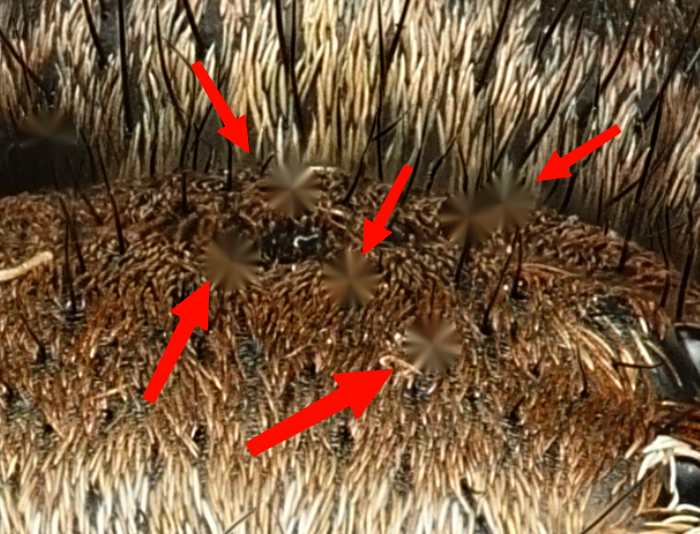
I don’t know if it’s only on my machine (MacBook Pro M4 48GB), but the spot removal tool generates strange artifacts. It reminds me of the Pucker Tool in Photoshop’s Liquify filter.
The fundamental question is to what degree MacroStudio should provide general editing capabilities—like dust removal or masking—which already work seamlessly in LR/PS and other (free) platforms like Affinity (e.g., the Inpainting Brush Tool). Certainly not everyone uses these programs, but those who do will inevitably draw comparisons.
I am a big fan of the UNIX philosophy: “Do one thing and do it well.” If there is a need for retouching beyond traditional, macro-specific tools, it might be worth considering a “Send-To ” shortcut for more general editing tasks.
Log in to comment and vote
Comments1
Ryan Cush
Jul 17
Hi Klaus - thanks for pointing this out. You’re right, the v1 Spot Correct didn’t look good. I never noticed it personally because I only used it on really tiny spots where the “pucker” effect wasn’t so visible. I just released an update where I changed this to a Heal effect, so it samples a nearby area to match color and texture. The next step would be to add a Clone tool, which I’m happy to do, but in the interest of simplicity I’m curious to see how well Heal works. Keep the feedback coming!
Also, I do have on the roadmap to release Lightroom (and CaptureOne) plugins, which would help support your last point.