Color Autostack vs Original
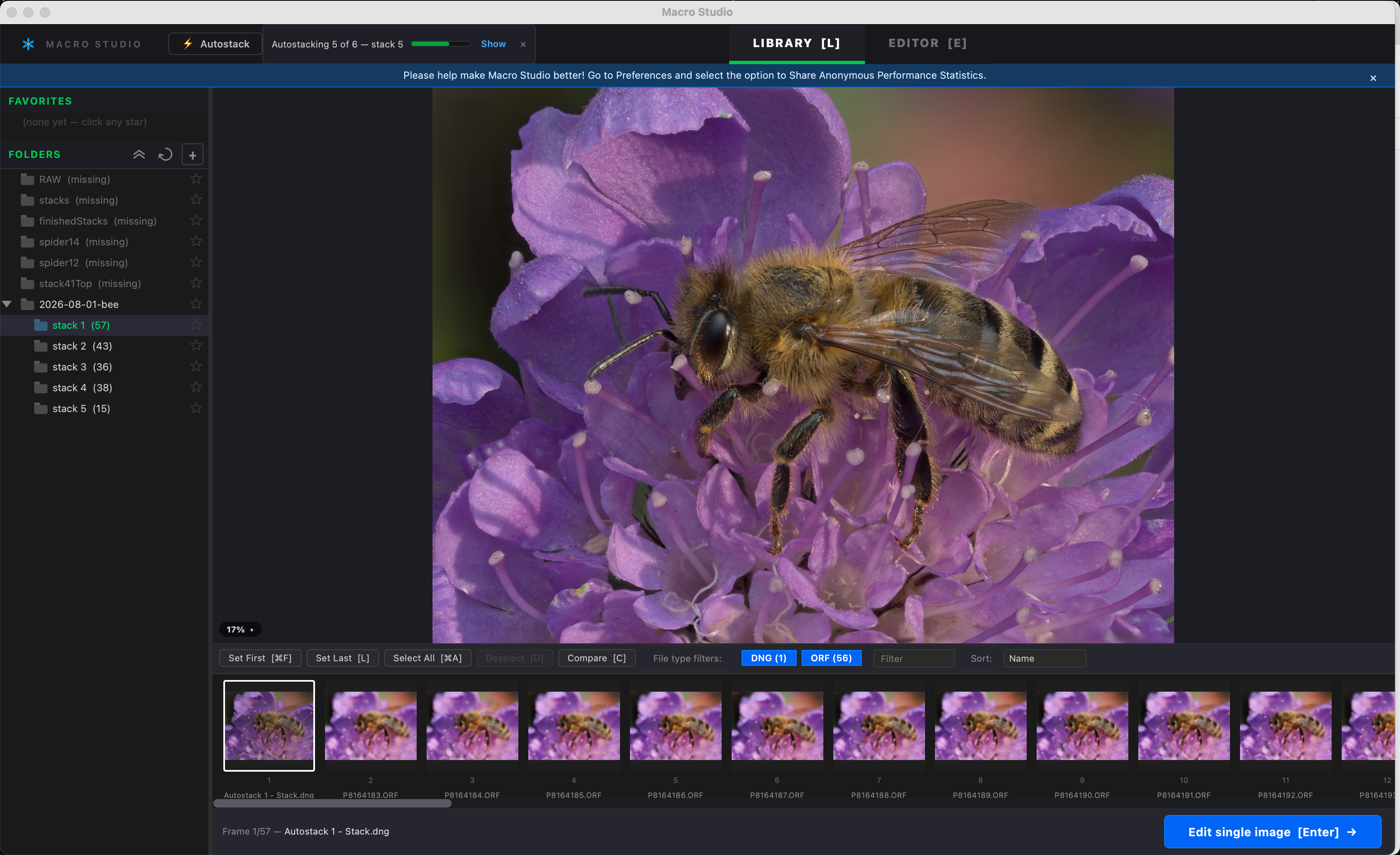
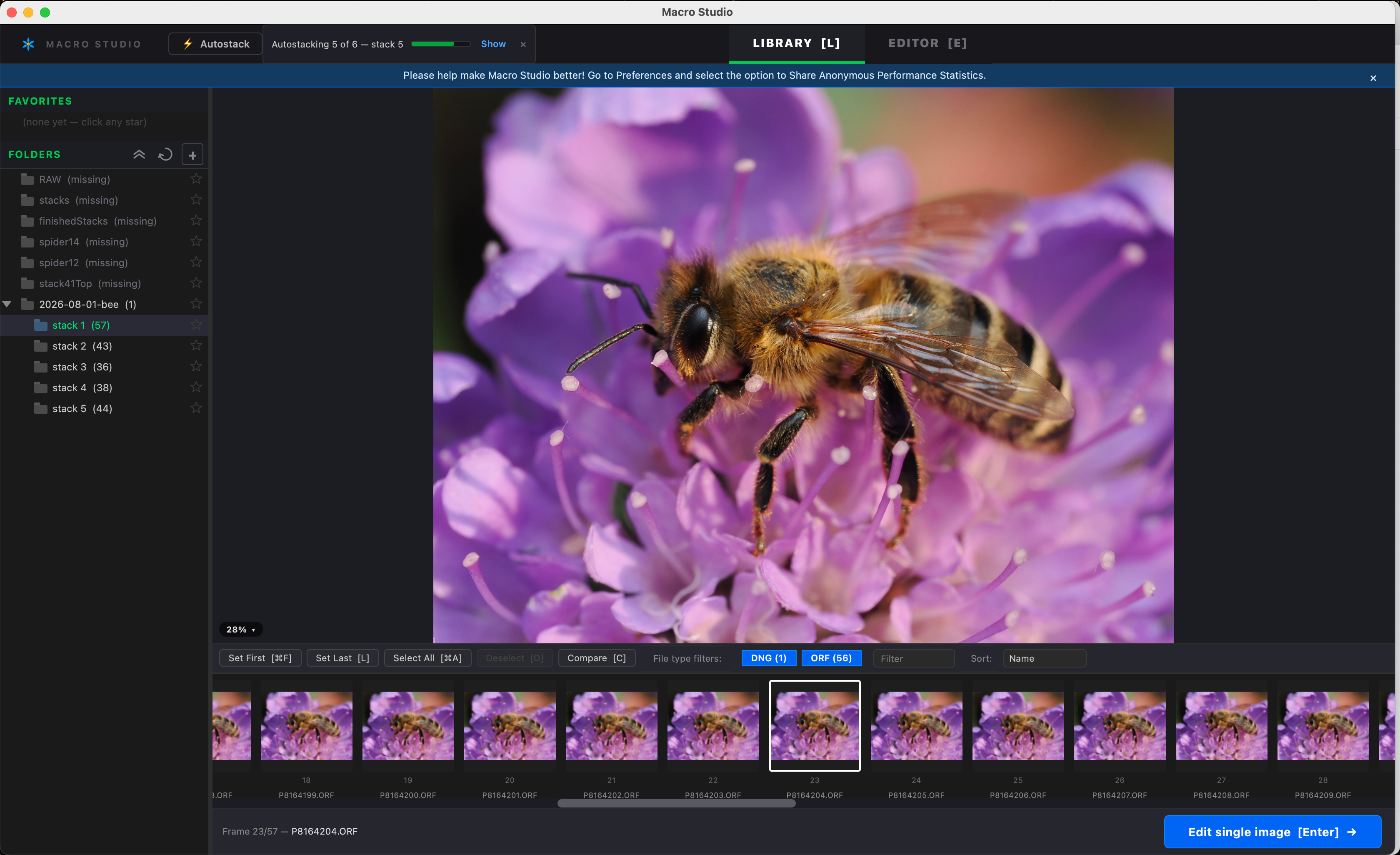
I use Autostack only for preview, so it isn’t a big issue for me, but why is the color of the stack so different from the RAW files?
I still use Lightroom for editing - old habits are hard to get by 😂 - and I realized when I stack jpgs or tiffs exported from Lightroom, they have better color than when I use the RAW files for stacking.
Stacking from the Library is still better in color than the autostack, but not as good as from jpg/tiff.
Any idea?
Thanks for all your hard work, Ryan 🙏🙏
Log in to comment and vote
Comments5
Ryan Cush
Aug 2
@Wolf Amri You have a good eye! There are two separate things going on.
The big one is by design. When Macro Studio stacks from RAW, it renders the files deliberately neutrally (camera white balance and a straight color conversion, but no camera profile and no tone curve.) The idea is to hand you a flat, un-opinionated base to edit. When you stack JPEGs or TIFFs exported from Lightroom, all of Lightroom's color work is already baked into those pixels (the Adobe Color profile, Lightroom's default tone curve, and your own edits) and we pass it through untouched. So you're really comparing "our neutral rendering of your RAWs" against "Lightroom's finished rendering," and Lightroom's is doing a lot more. Given that you're editing in Lightroom anyway, exporting 16-bit TIFFs and stacking those is a perfectly sensible workflow.
The Autostack difference, though, is a bug on my side. Manual stacks apply a "match camera brightness" step that also protects the black point; Autostack was accidentally skipping it, so its output comes out flatter with slightly milky blacks. It's tracked and the fix is small, so it should land in an upcoming release, after which Autostack previews will match what you get stacking the same frames from the Library.
Thank you as always for your eagle eyes and for taking the time to report these!
Wolf Amri
Aug 2
Thank you, Ryan. Always a pleasure ;).
Personally, I would prefer that the color of the finished dng to be the same as the unprocessed RAW - just a thought ;).
Ryan Cush
Aug 3
Yes, understood. I’m learning a lot about color profile processing here, let me see if I can explain it decently well.
For JPEG/TIFF exports, Lightroom has already applied its own rendering to the RAW, which is why those files look good, and all of that comes through when you stack them. The problem is the color space that the file is encoded in. Macro Studio currently assumes every JPEG/TIFF is sRGB, so if you're exporting Adobe RGB or ProPhoto out of LrC, we misread the numbers and the colors come out flat. I've now got that reading the embedded profile properly, so it'll be fixed in a near-term update. (In the meantime, exporting sRGB gives you correct color today.)
Making stacks from RAW open in Lightroom looking like the original RAW does is a bigger change, and one I do plan to make. The idea is to stop baking our own color rendering into the DNG so Lightroom applies its own, exactly as it does to your source files — which I think is what you're after. It’s worth noting that that file would come to you as raw and unprocessed, for you to develop — your LrC edits on the source frames wouldn't carry through, since those live in Lightroom's catalog rather than in the files. (If you want LrC edits to be stacked, then you need to export to TIFF or JPEG so they get “baked in” to the pixels).
In the meantime, I also fixed Autostack so that it obeys your “Match camera brightness” preference, just like manual stacking. That will go out in the next update.
Wolf Amri
Aug 3
Awesome, thanks for that long reply, Ryan.
I wasn’t really meaning to talk about LR. It’s more that the RAW files look different in the film strip of macro studio, than the stacked DNGs - but that is from autostack. I have to admit, I don’t know if that changes in a regular stack made from within the library.
But reading your reply you are tackling color profiles in general. That surely is a boring topic - so thank you so much 😁.
Ryan Cush
Aug 3
Haha - hope I didn’t put you to sleep so early in the morning! Well, Autostack should now look exactly like your manual stacks with the release I just put out. Thanks again for reporting that! Now go get you some coffee!